Every lead. A next move.
Never lose a deal because you forgot to follow up. Purselo is a simple sales CRM for small businesses in Tanzania: track leads, follow-ups and pipelines, turn a lead into a quotation and an invoice without typing anything twice — and let the invoices you send every month create themselves.
Real product footage. Fictional demo data.
Built for people who actually sell.
Not a system for a sales department. A workspace for the person who has to make the next call.
- Freelancers
- Salespeople
- Agencies
- Consultants
- Small businesses
The problem
Good leads shouldn't disappear because nobody followed up.
- You speak to someone today.
- You send them something tomorrow.
- They say they'll get back to you.
- Another lead comes in.
- A week passes.
- The first opportunity quietly disappears.
Purselo keeps every conversation and its next action visible, so leads don't go cold while you're busy with the next one.
Product
From lead to quotation to invoice. Nothing typed twice.
Sixty seconds, start to finish: a lead added with a product, quantity and discount; moved into Quotation; a quotation created, taxed, noted and previewed; the order confirmed; the quotation converted to an invoice.
How it works
Four habits. One place.
Nothing to configure. Add a lead, keep it moving, send the paperwork from the same screen, and let the follow-ups tell you where to look.
- 01
Add the lead
Store the business and the contact, then pick what they want from your catalogue. Quantity, price and discount give you the deal value as you type.
- 02
Move the deal
Track each opportunity through the pipeline as the conversation progresses. Stages fit how you sell — services, products, or both.
NewContactedInterestedQuotationNegotiationOrder confirmedWon
- 03
Quote, then invoice
At Quotation, create the quotation from the lead — customer and items already filled in. When the order is confirmed, convert it to an invoice.
- 04
Follow up
Purselo shows what's due, overdue, upcoming, or going cold — and lines up the next step when you complete one.
Features
Everything a deal needs. Nothing it doesn't.
Eight things, done properly — from the first follow-up to the invoice that repeats every month. Every visual below is the actual product.
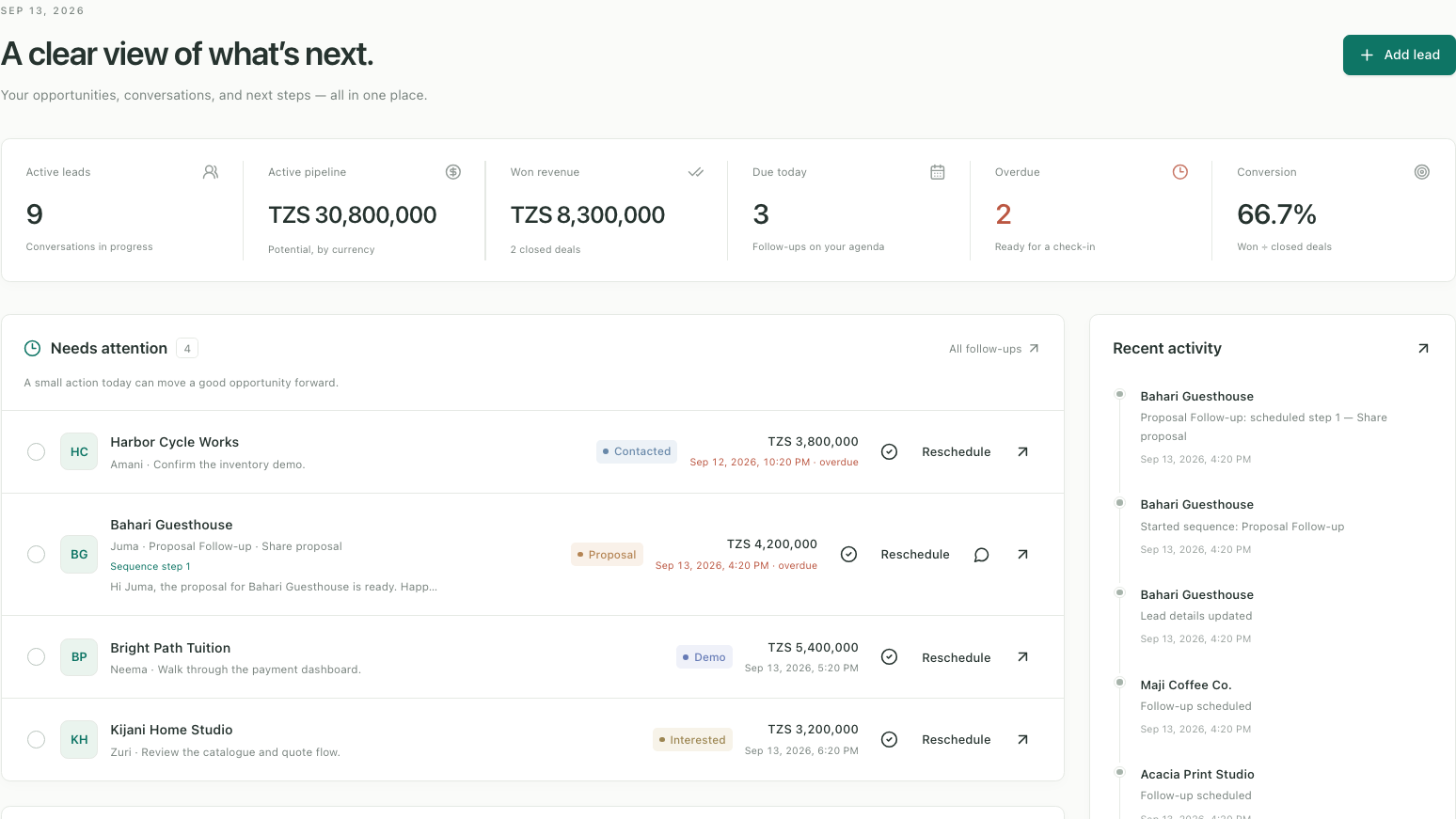
Sales dashboard
Active pipeline value, wins, overdue follow-ups, and the opportunities that need attention — on one screen.
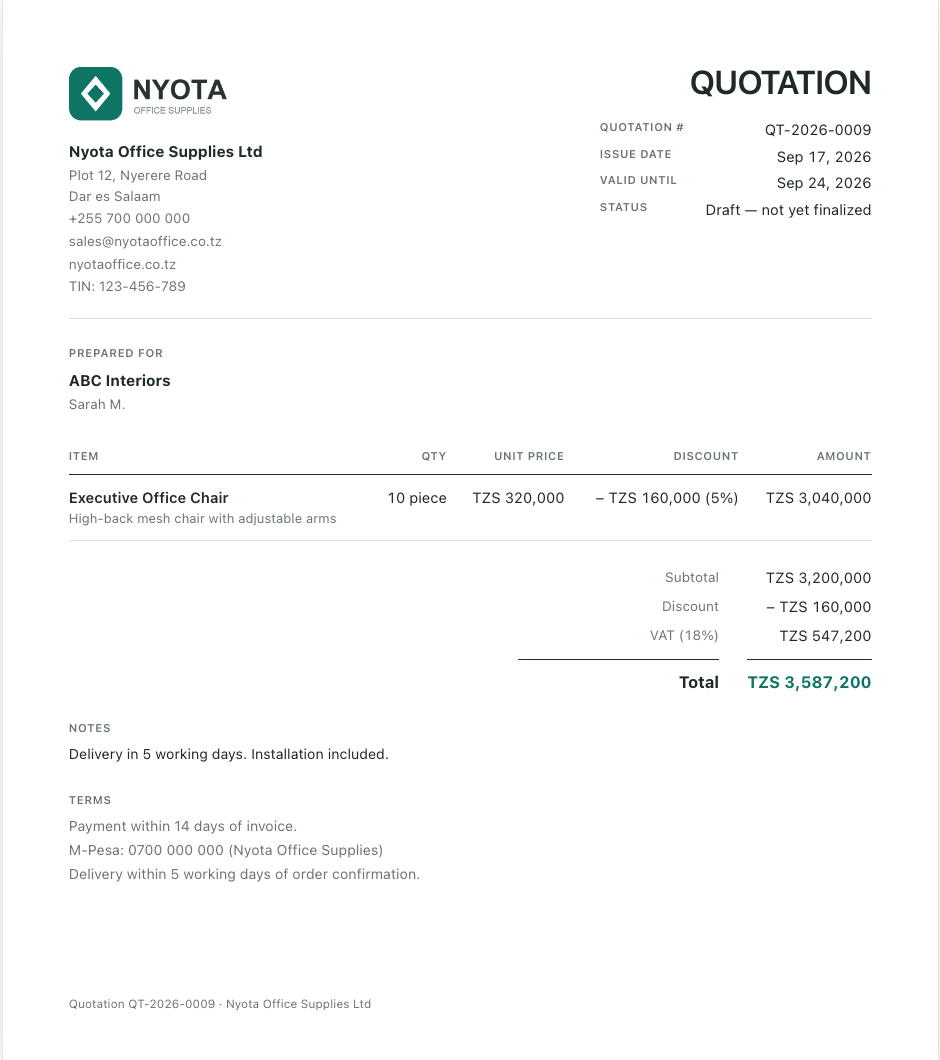
Quotations & invoices
Create a quotation from the lead, convert it to an invoice when the order is confirmed, and download print-ready PDFs.
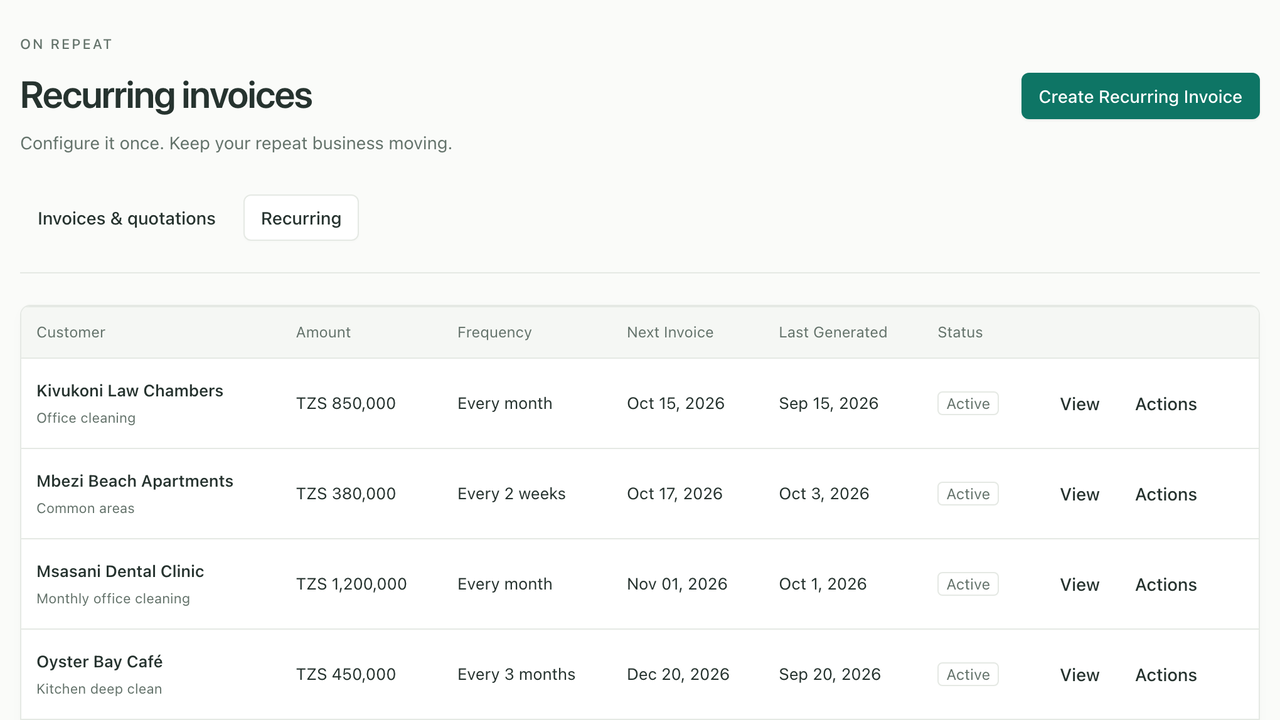
Recurring invoices
Bill the same customer weekly, monthly, quarterly or yearly. Set it up once and each invoice is created on schedule, as a draft or finalized.
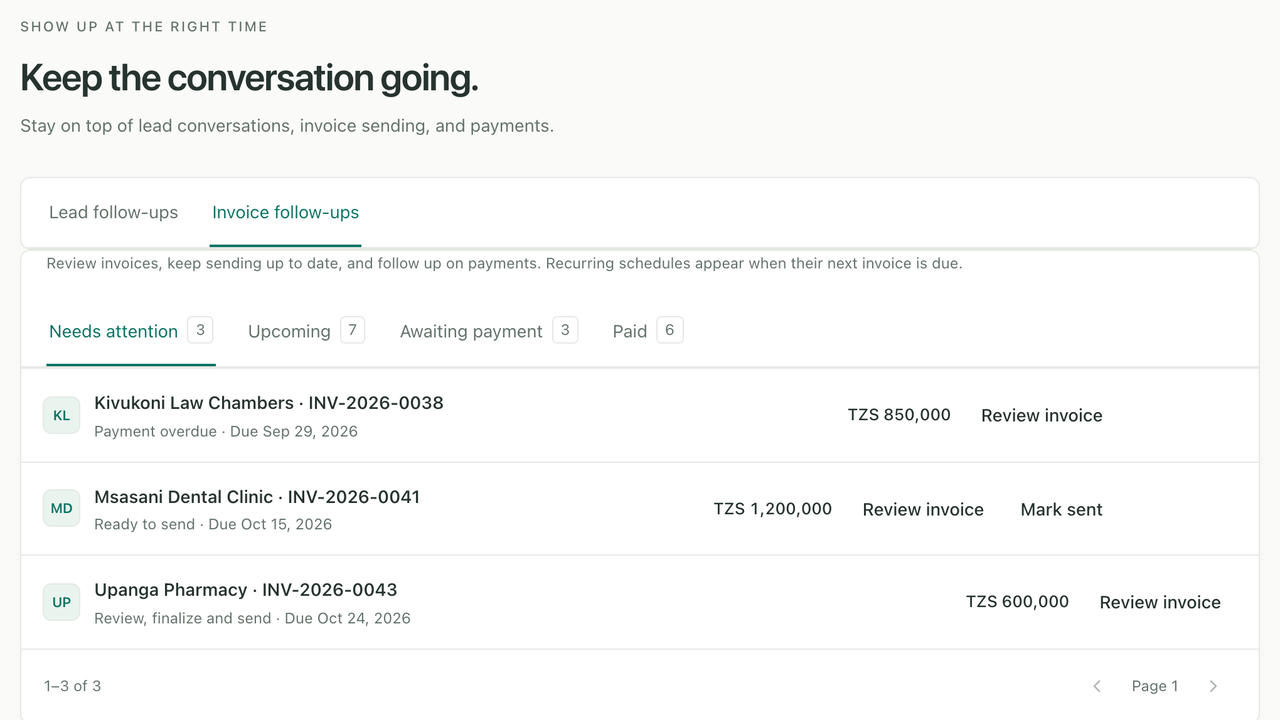
Invoice follow-ups
See which invoices are ready to send, which are due and who's overdue — then mark them sent, and paid when the money arrives.
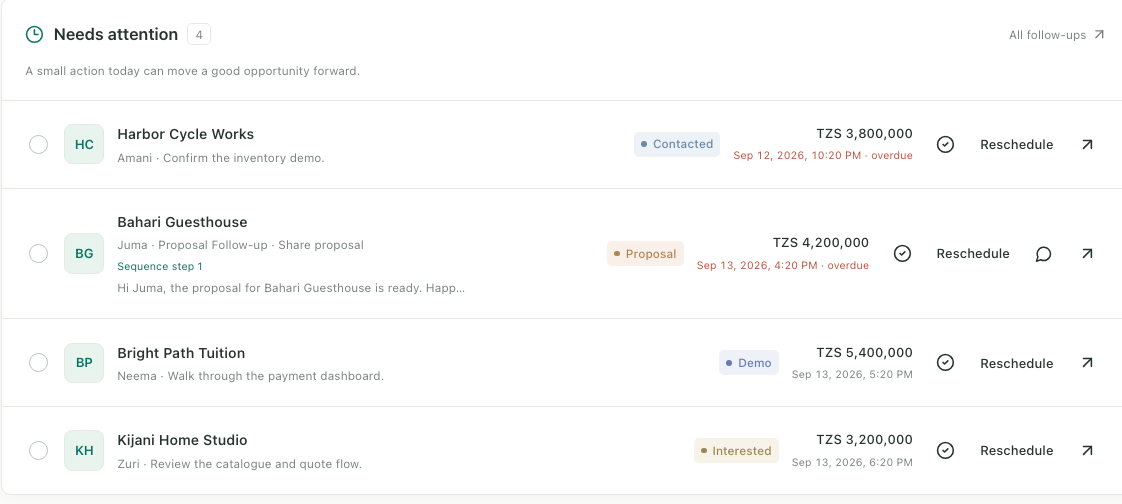
Follow-up tracking
Know who needs a message today, tomorrow, or is already overdue.
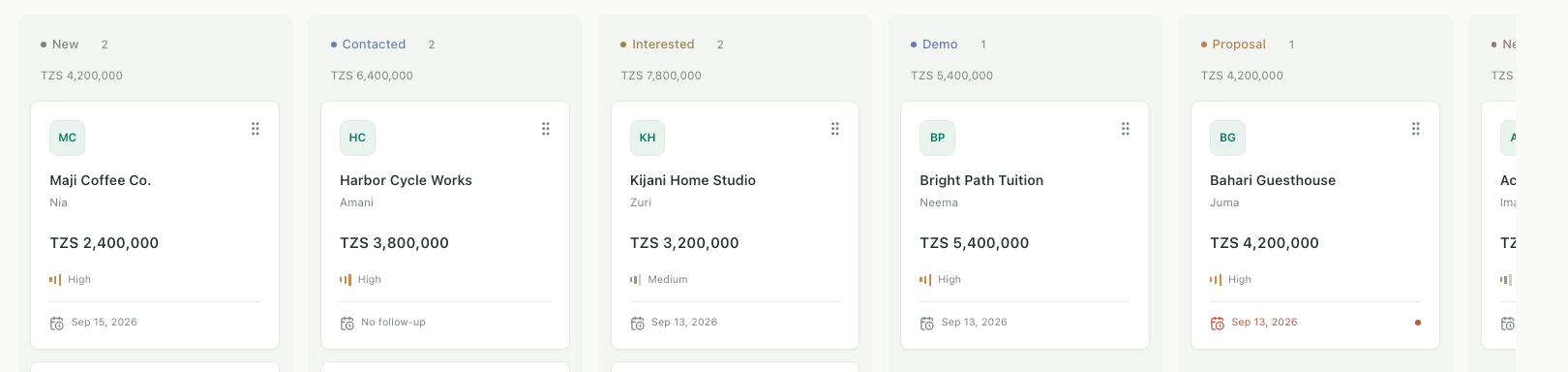
Sales pipeline
See every active opportunity and move deals visually through their stages — including Quotation and Order confirmed when you sell products.
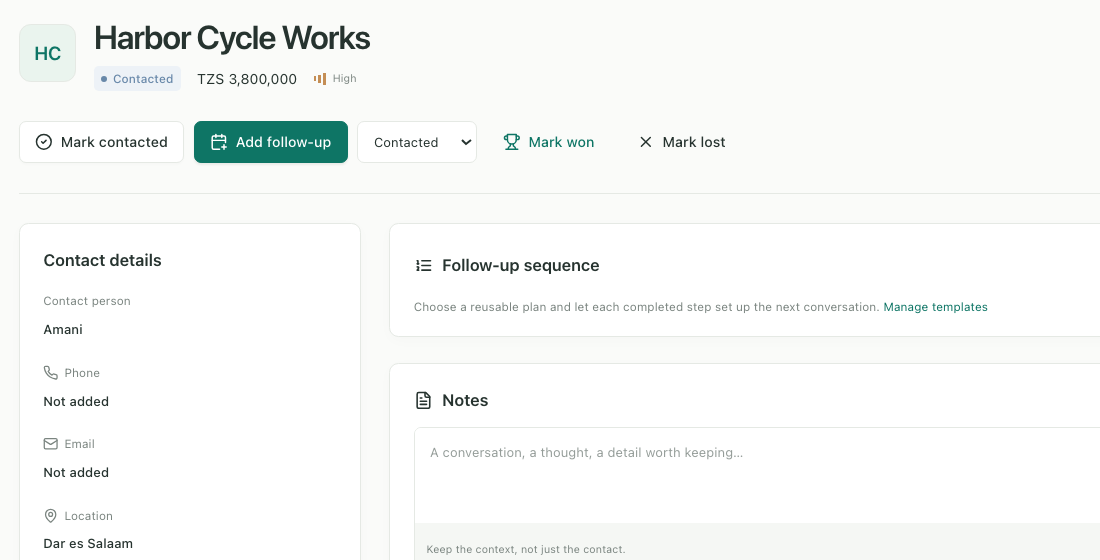
Lead management
Keep contacts, notes, requirements, the items they want, deal value, and history together.
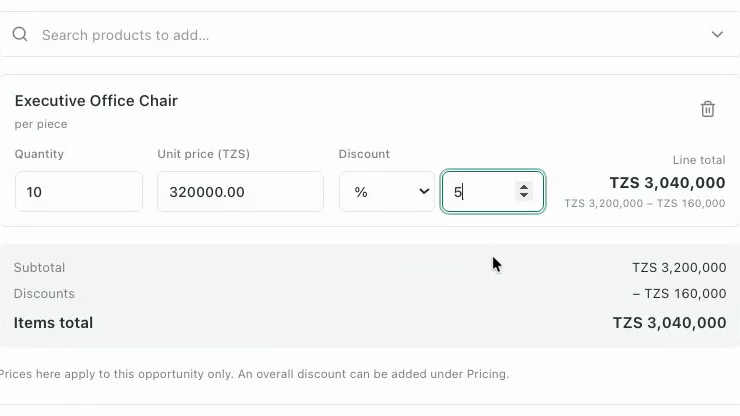
Product & service catalogue
Keep what you sell with default prices. Add items to a lead with a quantity, a negotiated price and a discount — the deal value updates as you type.
Quotations & invoices
The paperwork, from the same screen as the deal.
A quotation used to mean retyping the customer, the items and the prices into another tool. In Purselo the lead already knows all of that — so the document is one click, and the invoice is one more.
- Lead
- Quotation
- Order confirmed
- Invoice
Quotation. Prefilled from the lead, tax applied, a note added, previewed.
Invoice. Converted from the quotation — same customer, same items, same totals.
- Create a quotation from the lead: customer, items, negotiated prices and discounts are already filled in
- Apply tax, add a note and your terms, and preview the same layout the PDF uses
- Finalize to lock it — numbers like QT-2026-0009 and INV-2026-0003 are allocated for you
- Order confirmed? Convert the quotation to an invoice in one click. The quotation stays untouched
- Download print-ready A4 PDFs with your logo, TIN and payment instructions
- Mark quotations accepted, rejected or expired and invoices paid — it all shows on the lead's timeline
Your business name, address, TIN, logo, default tax and footer terms live under Settings and print on every document. Purselo records what was quoted and invoiced; it doesn't do accounting, stock deduction or fiscal integrations.
New — recurring invoices
Same customer. Same invoice. Every month.
If you clean an office, service a generator, host a website or rent out a space, you bill the same people for the same work, again and again — and type the invoice out each time. Set it up once in Purselo and every invoice after it is created on schedule.
- Schedule
- Invoice
- Sent
- Paid
- 01
Set it up once
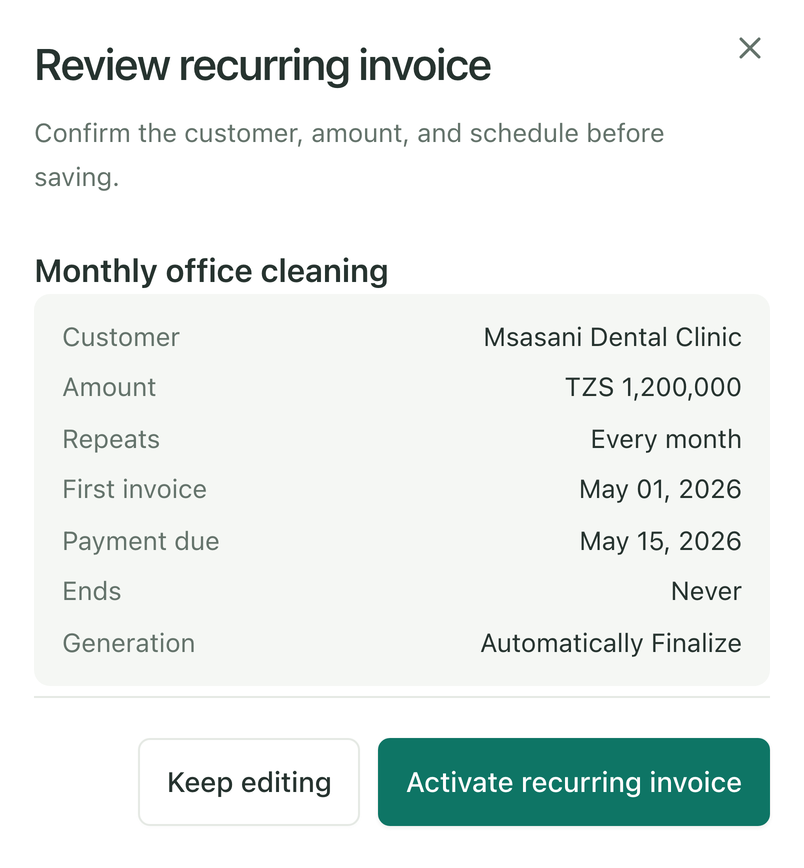
Pick the customer from one of your leads — their details, items and agreed prices come with them — or type a new one in. Then choose how often it repeats, the first invoice date, when payment is due and when it ends. Review it and activate it.
WeeklyMonthlyQuarterlyYearlyCustom interval
- 02
It runs on its own
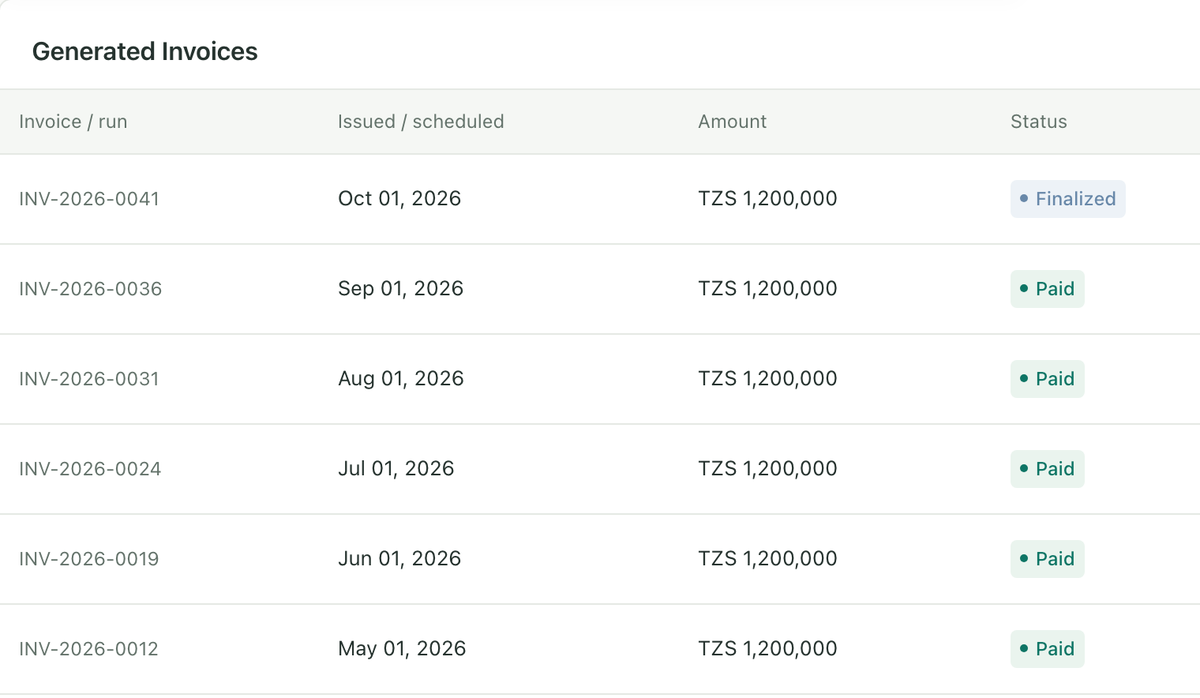
On each date Purselo creates the invoice — as a draft for you to check, or finalized with its own number and PDF. Nobody has to be logged in for it to happen.
Generate as DraftAutomatically Finalize
- 03
Get paid
Invoice follow-ups lists what's ready to send, what's due and who's overdue. You send each invoice your way, mark it sent, and mark it paid when the money arrives.
Needs attentionUpcomingAwaiting paymentPaid
The details
- Weekly, monthly, quarterly or yearly — or a custom interval, like every 2 weeks or every 6 months
- Ends never, on a date, or after a set number of invoices
- Payment due immediately, in 7, 14 or 30 days, or after any number of days you choose
- Finalized invoices get the next INV number, the same preview and the same PDF as any other invoice
- Generate Invoice Now bills one extra today without moving the schedule
- Pause, resume, edit or cancel at any time — changes only affect future invoices, never ones already issued
- Billing on the 31st? February gets the 28th or 29th, and March is back on the 31st
- Every invoice a schedule has created is listed on it, with its status and PDF
Purselo creates recurring invoices but never sends them for you. You send each one yourself — on WhatsApp, by email or on paper — and marking it sent clears the reminder. Payment reminders stay until the invoice is paid.
What needs attention
Open Purselo and know exactly what to do next.
A CRM that only stores data leaves the remembering to you. Purselo sorts your leads by urgency — overdue, due today, going cold — so the first screen of the day is already a to-do list.
Overdue
- BS
Bicycle Shop
Confirm the inventory demo
TZS 3,800,000
2 days overdue
- LB
Local Business
Share the proposal
TZS 4,200,000
1 day overdue
- BS
Today
- DE
Daily Essentials
Walk through the payment dashboard
TZS 5,400,000
Follow up today
- DE
Going cold
- TC
Tuition Centre
Review the catalogue and quote flow
TZS 3,200,000
Last contacted 9 days ago
- TC
Complete a follow-up from the dashboard and the overdue count updates immediately.
Pipeline
Every opportunity, in one view.
See exactly where every deal stands and move it forward — without digging through spreadsheets, chats, and notes.
- New
- Contacted
- Interested
- Demo
- Proposal
- Won
Drag a card by its handle, or change the stage from inside the lead. Keyboard works too.
Your CRM shouldn't get between you and the conversation.
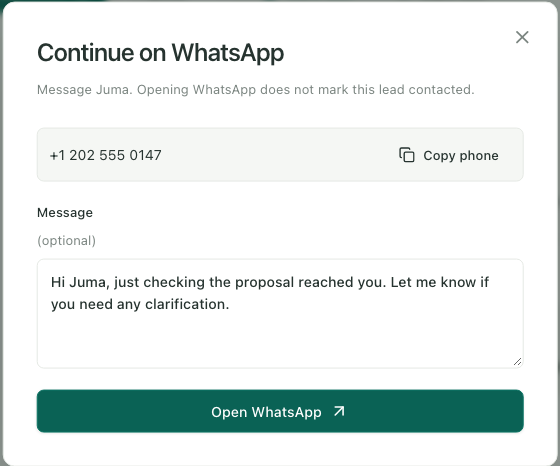
Most of these deals happen in WhatsApp threads. Purselo doesn't try to replace that — it gets you into the right chat in one tap and keeps the follow-up, the notes and the deal value organised around it.
- Opens the lead's WhatsApp chat from the lead page or a follow-up
- Keeps your follow-up dates, notes and deal value next to the conversation
- You write and send every message yourself — nothing is automated
Purselo is not connected to the WhatsApp Business API and does not read, send, or track messages.
Pricing
Simple pricing.
Purselo is ready for solo sellers today. Team and Enterprise plans are on the way — talk to us if you need them sooner.
Solo
Available nowFor freelancers and independent salespeople. Available now.
TZS 25,000/ month
- 1 user
- Unlimited leads
- Pipeline
- Follow-ups and sequences
- Product & service catalogue
- Quotations and invoices (PDF)
- Recurring invoices
- Invoice follow-ups
- Your logo, tax and terms on documents
- WhatsApp shortcuts
- Dashboard
Team
Coming soonFor small sales teams.
TZS 45,000/ month
- Up to 5 users
- Everything in Solo
- Shared pipeline and catalogue
- Lead assignment
- Team follow-ups
- Team activity
- Performance overview
Enterprise
Coming soonFor larger teams and businesses that want it on their own terms. Priced for your team size.
Custom
- Unlimited users
- Everything in Team
- Self-hosted on your own server
- Dedicated onboarding
- Priority support
Prices are in Tanzanian shillings, per month. Your workspace is set up with you personally over Instagram DM — no payment is collected on this site.
Why Purselo exists
Built because I needed it myself.
Purselo started as a Saturday-night project. I needed a simple way to keep track of the businesses I'd spoken to, the deals I was working on, and who I had to follow up with next.
What began as a personal tool started feeling useful beyond my own workflow. So I kept building.
It's early, it's being used every day, and it's shaped by real follow-ups rather than a feature checklist.
— Dhruv, the person building Purselo
FAQ